
Every AI receptionist on the market says the same two things on its homepage: "sounds human" and "24/7." We say them too. But "24/7" is doing a lot of quiet work in that sentence, because always-on coverage is less about the AI staying awake - software doesn't sleep - and more about everything around it: uptime, simultaneous calls, escalation rules, and what happens on the one call the AI can't finish. This is what round-the-clock coverage actually requires, and how to check the claim before you put your phone number behind it.
Our articles are still written by humans!
Get human written articles in your Google feed.
The short answer
A 24/7 AI receptionist is a voice agent that answers your business line every hour of every day - greeting callers, answering questions, booking appointments, taking structured messages, and escalating genuine emergencies to a human. The honest version of the pitch is this: the AI part is easy to keep running around the clock, and the useful part is everything you configure around it. Whether "24/7" means anything depends on whether the service can answer several calls at once, stay up when you're not watching, and know which 2 a.m. call justifies waking you. Those are checkable claims, and this guide is about checking them.
Why 24/7 is the whole point of AI reception
Strip away the novelty and an AI receptionist is competing with three things: your own staff, a human answering service, and voicemail. In ordinary business hours that's a real contest - a good front-desk person beats software at plenty. But across the full week, the contest stops being close, because a staffed desk covers roughly 40 of the 168 hours in a week. The other 128 hours - evenings, nights, weekends, holidays, lunch rushes - are where missed calls quietly pile up, and where covering with humans gets expensive fast.
Speed compounds the problem. The classic lead-response research written up in Harvard Business Review found the odds of qualifying a lead collapse within minutes of first contact. A caller at 9 p.m. who reaches voicemail doesn't wait for your 9 a.m. callback - they dial the next result. So the question isn't whether always-on coverage is nice to have; it's whether you'd rather the always-on answerer be a per-minute call centre, a rotation of tired humans, or software that treats every hour identically. For most small businesses that math lands on the software.
What a 24/7 AI receptionist does across a day
The marketing shorthand is "never miss a call," but the calls it catches are different at different hours - and that's exactly why round-the-clock matters more than after-hours-only:
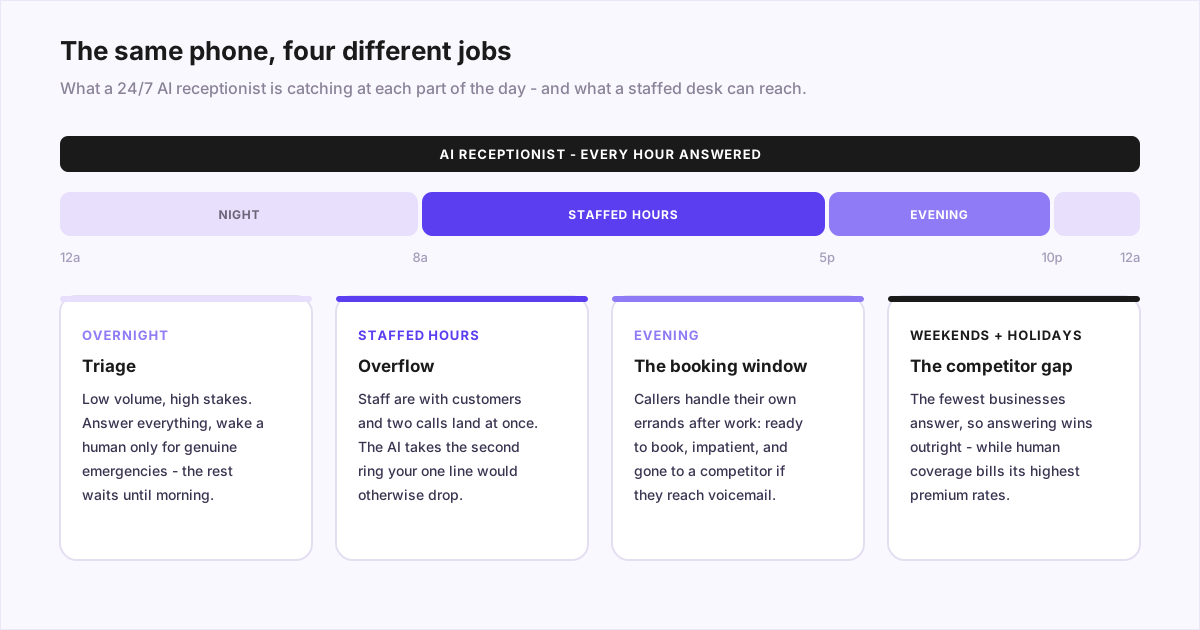
- Business hours: overflow and busy signals. Your team is with a customer, or two people call at once. The AI takes the call your line would otherwise drop - it answers simultaneous calls without a hold queue.
- Evenings: the booking window. People handle their own errands after their workday ends. These are ready-to-book callers who want a confirmed slot, not a callback promise.
- Overnight: triage. Low volume, high stakes. The job is to answer everything, book or log the routine, and wake your on-call person only for a genuine emergency.
- Weekends and holidays: the competitor gap. The hours when the fewest businesses answer are the hours when answering wins customers outright - and when human coverage bills at its highest premiums.
What "24/7" actually requires under the hood
Here's the critical part most vendor pages skip, ours included until this post. An AI that can talk is table stakes. Always-on coverage stands on four less glamorous legs:
- Uptime. The AI is only as available as the platform and telephony behind it. Outages are rare but real across every provider, which is why the next leg matters.
- A fallback path.What happens if the service is down or the AI is stumped? A sane setup fails toward a human transfer, a callback promise it actually keeps, or at minimum a recorded message - never silence. We've written up what happens when an AI receptionist can't answer in detail.
- Concurrency.True 24/7 includes the moment three people call at once. Software answers all three identically; a single human, however good, physically can't.
- Escalation rules. Round-the-clock answering without round-the-clock judgment is a liability. You define the emergencies; the AI applies the definition identically on every call and transfers to a human when the rule fires.
Your 24/7 coverage options, compared
Four ways to cover all 168 hours, with the trade-offs stated plainly:
Round-the-clock coverage options
| Option | True 24/7? | Simultaneous calls? | Cost behaviour |
|---|---|---|---|
| Voicemail | Technically - but most callers hang up rather than leave a message | Yes, uselessly | Free, minus every caller who dials a competitor |
| Human staff in shifts | Yes, at multiple salaries | One call per person | Highest - night differentials, weekend and holiday pay |
| Live answering service | Usually - check their overnight staffing | Yes, via a shared call centre | Per-minute, with night/holiday premiums common |
| AI receptionist | Yes - same behaviour every hour | Yes, natively | Flat monthly fee; midnight costs the same as noon |
The human options aren't strawmen - a live service genuinely wins when calls are emotionally heavy or high-stakes, and we compare all three honestly in AI vs. virtual receptionist vs. answering service. But for the specific job of being available every hour, the structural facts favour software: per U.S. Bureau of Labor Statistics figures a single receptionist salary runs tens of thousands of dollars a year - and one salary covers less than a quarter of the week.
How to check a vendor's 24/7 claim
Every provider claims 24/7, so the claim itself tells you nothing. Five questions separate the real thing from the brochure - ask them before you forward your number, ours included:
- "What's your uptime history?"Not the SLA promise - the track record, and whether there's a status page you can see.
- "How many simultaneous calls can my number take?" If the answer is one, the busy-hour half of 24/7 is missing.
- "What happens when the AI can't answer?" You want a concrete fallback chain, not reassurance that it always can.
- "Can I set different rules for nights and weekends?" Escalation that fits 2 p.m. is usually wrong for 2 a.m. Rules should be schedulable.
- "Call the demo line at midnight." Not a question - a test. Call outside business hours, play a routine caller, then play an emergency, and see what actually happens.
This is a slice of the larger evaluation - voice quality, calendar integrations, languages, contracts - which we cover step by step in how to choose an AI receptionist.
What round-the-clock coverage costs
The pricing structure matters more than the sticker. Human coverage prices by time, so the expensive hours are exactly the ones you're buying 24/7 coverage for: nights, weekends, holidays. AI prices by subscription, so extending from business hours to always-on typically costs nothing extra - the flat monthly fee (commonly $30-$300 by volume and features) already includes the midnight calls. We break down the models, the per-minute traps, and the questions to ask in our AI receptionist pricing guide, and our own flat monthly pricing is public if you want a concrete number to compare against.
The bottom line
"24/7" is the least differentiated claim in this market and one of the most important things to get right. The AI staying awake is the easy part; what you're really buying is concurrency during your busy hours, sane failure behaviour during your closed ones, and escalation rules that wake a human for exactly the right calls. Those are all checkable - so check them, starting with a midnight call to the vendor's own line.
If you want to run that test on us, you can talk to our AI receptionist right now- it's the same agent that answers at 3 a.m. And if your coverage gap is specifically the closed hours rather than the whole clock, our after-hours answering service guide walks that narrower problem in depth.
Frequently asked questions
What is a 24/7 AI receptionist?
It's an AI voice agent that answers your business phone around the clock - nights, weekends, and holidays included - with no shift changes and no overtime. It greets callers in a natural voice, answers questions about your business, books appointments onto your calendar, takes structured messages, and escalates genuine emergencies to a human you designate. Because it's software, the 3 a.m. version of it behaves exactly like the 3 p.m. version, and it can answer several calls at once instead of sending overflow to voicemail.
Is an AI receptionist really available 24/7?
The AI itself doesn't sleep, but true 24/7 coverage depends on the plumbing around it: the platform's uptime, whether it can take simultaneous calls, and what happens when it can't answer a question. Ask a vendor three things - what's your uptime history, how many concurrent calls can my number take, and what's the fallback if the system is down or stumped. A serious provider has clear answers to all three; a thin wrapper around a demo usually doesn't.
How much does a 24/7 AI receptionist cost?
Typically a flat monthly subscription in the range of $30-$300 depending on call volume and features - and crucially, the price is the same whether the call lands at noon or midnight. That's the structural difference from human options: live answering services bill per minute and often add night and holiday premiums, and staffing humans in shifts around the clock costs multiples of a single salary. With AI, extending coverage from business hours to 24/7 usually costs nothing extra at all.
Can a 24/7 AI receptionist handle a real emergency at 3 a.m.?
Yes - by triaging, not by pretending to fix the problem itself. You define what counts as an emergency for your business (a burst pipe, no heat, a lockout, an urgent legal matter), and the AI applies those rules identically on every call: it warm-transfers or rings your on-call phone for genuine emergencies and books or takes a message for everything else. That consistency is the point - it never gets judgment fatigue at 3 a.m., and it never wakes you for a caller who just wants opening hours.
What's the difference between a 24/7 AI receptionist and an after-hours answering service?
Scope. An after-hours answering service covers only the hours you're closed, usually as a human service billed per minute, and typically takes messages rather than finishing the job. A 24/7 AI receptionist answers all the time - it covers after-hours and the busy daytime moments when your line is engaged or your staff is with a customer. For most small businesses the daytime overflow calls are worth as much as the midnight ones, which is why always-on tends to beat after-hours-only.